My Entra ID Conditional Access Policy Design Baseline is updated at least twice every year, always containing lessons learned from the field. It is based on my recommendations of how Conditional Access should be deployed to create a strong zero trust security posture.
Note that all organisations are different and you might need to adjust the baseline to fit your specific needs. My goal is to provide inspiration and a great starting point for your own Conditional Access design.
Current baseline version:
15
Release date:
2024-11-26
There are two methods of deployment:
Option 1: Manual Deployment
Download the Excel version of the baseline and manually create each Conditional Access policy in the Azure portal.
Version 7 of this baseline was the first version with DCToolbox automation support, and version 15 was the first to change deployment model to use the Conditional Access Gallery. This means that you can now automatically deploy this baseline with DCToolbox (or create your own JSON templates).
To automatically install the baseline, run this in PowerShell 7:
# Install DCToolboc from the PowerShell Gallery:
Install-Module -Name DCToolbox -Force

# Deploy the baseline as a complete Conditional Access PoC in report-only mode, add a PILOT prefix, AND create documentation in Markdown format.
Deploy-DCConditionalAccessBaselinePoC -AddCustomPrefix 'PILOT - ' -CreateDocumentation
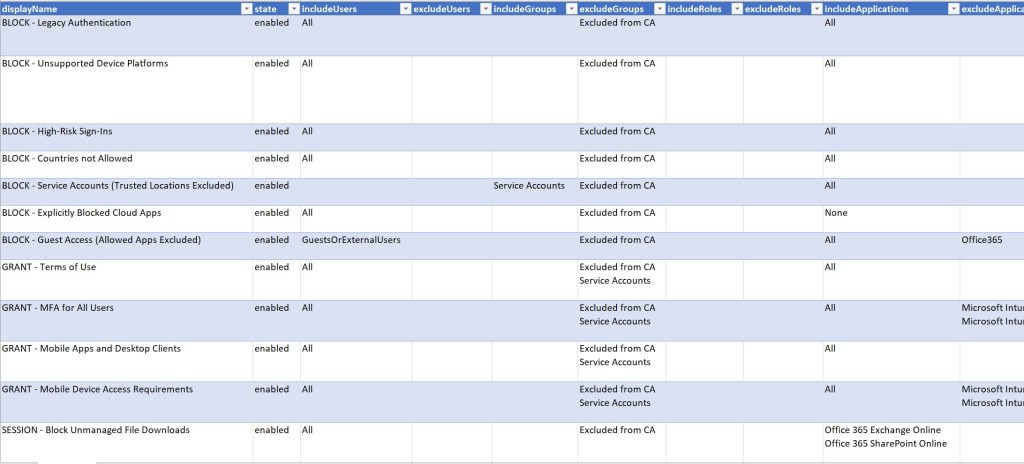
Baseline Policies Explained
This is a short explanation of each policy in the baseline.
Policies
GLOBAL – 1010 – BLOCK – Legacy Authentication
GLOBAL – 1020 – BLOCK – Device Code Auth Flow
GLOBAL – 1030 – BLOCK – Unsupported Device Platforms
GLOBAL – 1040 – BLOCK – All Countries Except Allowed
GLOBAL – 1050 – BLOCK – High-Risk Countries
GLOBAL – 1060 – BLOCK – Service Accounts (Trusted Locations Excluded)
GLOBAL – 1070 – BLOCK – Explicitly Blocked Cloud Apps
GLOBAL – 1080 – BLOCK – Guest Access to Sensitive Apps
GLOBAL – 1090 – BLOCK – High-Risk Sign-Ins
GLOBAL – 1100 – BLOCK – High-Risk Users
GLOBAL – 2010 – GRANT – Medium-Risk Sign-Ins
GLOBAL – 2020 – GRANT – Medium-Risk Users
GLOBAL – 2040 – GRANT – Terms of Use (All users)
GLOBAL – 2050 – GRANT – MFA for All Users
GLOBAL – 2055 – GRANT – Phishing Resistant MFA for Admins
GLOBAL – 2060 – GRANT – Mobile Apps and Desktop Clients
GLOBAL – 2070 – GRANT – Mobile Device Access Requirements
GLOBAL – 3010 – SESSION – Admin Persistence (9 hours)
GLOBAL – 3020 – SESSION – BYOD Persistence
GLOBAL – 3030 – SESSION – Register Security Info Requirements
GLOBAL – 3040 – SESSION – Block File Downloads On Unmanaged Devices
OVERRIDE – 0001 – GRANT – Example
GLOBAL – 1010 – BLOCK – Legacy Authentication
Policy Name
GLOBAL – 1010 – BLOCK – Legacy Authentication
ID
1010
Description
This global policy blocks all connections from insecure legacy protocols like ActiveSync, IMAP, POP3, etc. Blocking legacy authentication, together with MFA, is one of the most important security improvements your can do in the cloud.
GLOBAL – 1030 – BLOCK – Unsupported Device Platforms
Policy Name
GLOBAL – 1030 – BLOCK – Unsupported Device Platforms
ID
1030
Description
Block unsupported platforms like Windows Phone, Linux, and other OS variants. Note: Device platform detection is a best effort security signal based on the user agent string and can be spoofed. Always combine this with additional signals like MFA and/or device authentication.
GLOBAL – 1040 – BLOCK – All Countries Except Allowed
Policy Name
GLOBAL – 1040 – BLOCK – All Countries Except Allowed
ID
1040
Description
This global policy blocks all connections from countries not in the Allowed countries whitelist. You should only allow countries where you expect your users to sign in from. This is not a strong security solution since attackers will easily bypass this with a proxy service, however, this effectively blocks a lot of the automated noise in the cloud.
This global policy blocks all connections from countries in the High-Risk Countries list. This is not a strong security solution since attackers will easily bypass this with a proxy service, however, this effectively blocks a lot of the automated noise in the cloud.
GLOBAL – 1060 – BLOCK – Service Accounts (Trusted Locations Excluded)
Policy Name
GLOBAL – 1060 – BLOCK – Service Accounts (Trusted Locations Excluded)
ID
1060
Description
Block service accounts (real Entra ID user accounts used by non-humans) from untrusted IP addresses. Service accounts can only connect from allowed IP addresses, but without MFA requirement. Only use service accounts as a last resort!
GLOBAL – 1070 – BLOCK – Explicitly Blocked Cloud Apps
Policy Name
GLOBAL – 1070 – BLOCK – Explicitly Blocked Cloud Apps
ID
1070
Description
This policy can be used to explicitly block certain cloud apps across the organisation. This is handy if you want to permanently block certain apps, or temporary block unwanted apps, for example, if there is a known critical security flaw.
This global policy blocks all high-risk authentications detected by Entra ID Protection. This is called risk-based Conditional Access. Note that this policy requires Entra ID P2 for all targeted users.
Same as above but looks at the user risk level instead of the sign-in risk level. For example, many medium risk sign-ins can result in a high-risk user.
This global policy forces Terms of Use, like an Terms of Use or NDA, on all users. Users must read and agree to this policy the first time they sign in before they’re granted access.
Protects all user authentications with MFA. This policy applies to both internal users and guest users on all devices and clients. Intune enrollment is excluded since MFA is not supported during enrollment of fully managed devices.
GLOBAL – 2070 – GRANT – Mobile Device Access Requirements
Policy Name
GLOBAL – 2070 – GRANT – Mobile Device Access Requirements
ID
2070
Description
Requires apps to be protected by Intune App Protection Policies (MAM) on iOS and Android. This blocks third-party app store apps and encrypts org data on mobile devices.
GLOBAL – 3010 – SESSION – Admin Persistence (9 hours)
Policy Name
GLOBAL – 3010 – SESSION – Admin Persistence (9 hours)
ID
3010
Description
This policy disables token persistence for all accounts with admin roles assigned. It also sets the sign-in frequency to 9 hours. This is to protect against Primary Refresh Token stealing attacks by keeping such tokens few and short-lived. Always use separate cloud-only accounts for admin role assignments.
This policy disables token persistence for all accounts signing in from a non-compliant (unmanaged) device. It also sets the sign-in frequency to 9 hours.
GLOBAL – 3040 – SESSION – Block File Downloads On Unmanaged Devices
Policy Name
GLOBAL – 3040 – SESSION – Block File Downloads On Unmanaged Devices
ID
3040
Description
This policy blocks file downloads in SharePoint Online, Teams, OneDrive, and Exchange Online on unmanaged devices. Note that App Enforced Restrictions must be enabled in the services for this to work.
Finally, this is an example policy. All scenarios that deviates from the global baseline should have the OVERRIDE prefix, and be targeted by groups. These groups of users can be excluded from global policies. In this way, we have a strong foundations, and manages deviations with small groups of users.
This baseline will work for many organisations out of the box but it can also serve as a starting point for a modified version. Some organisations might require different policys for differens departments and if that’s the case it is easy to just create multiple copies of the required policies and filter on group membership.
Daniel is a Microsoft Security MVP, Microsoft 365 security expert, blogger and consultant at Exobe, based in Sweden.
View all posts by Daniel Chronlund
Published
47 thoughts on “Entra ID Conditional Access Policy Design Baseline with Automatic Deployment Support”
For your service account policy why are you including trusted locations and not just all locations? Also for the service accounts that we are including should that be all service accounts or just ones that are accessing things in Azure?
I’m using “Trusted locations” because “All locations” might include “Untrusted locations” that I might use to block certain scenarios. I believe this is a flexible and clear design.
The service accounts should only be the ones that authenticate with Azure AD. The service might be in the cloud or on-prem but the authentication happens in Azure AD and Conditional Access is used.
On Service Accounts (Trusted Locations Excluded) shouldn’t be Include Any location and Exclude Selected locations (or maybe All trusted locations)?
GRANT – MFA for All Users force even All guest and external users to install Microsoft Authenticator app, which is not an issue, but you should mention it.
When testing the policy “Block – Service Accounts..” using the What If tool, a user in the service accounts group is:
– Granted access if the account uses Modern Auth and is in an untrusted location.
– Blocked access if the account is in the “office” location and uses legacy authentication (via the policy Block – Legacy Auth…)
Can you confirm the above statements are correct when using this policy?
Service accounts will typically use basic authentication, so the policy to block legacy auth will invalidate the use of this policy in this scenario – Unless this policy is not designed for this purpose?
This is an excellent resource that we are starting to implement in our organisation, we just need a little clarification on this policy.
We are attempting to secure accounts for scanners and other devices located in an office.
These accounts can only use basic auth and are only allowed to authenticate from specific locations.
Can this policy achieve the goal of the above scenario?
Thank you for the feedback!
Thank you! The BLOCK – Service Accounts policy blocks all authentications for the group with included service accounts, that comes from an IP adress not listed in the allowed service accounts trusted locations. The idea is that service accounts are bad and should not be able to sign-in, but we need a couple of them and they are only allowed to sign-in from a predefined set of IP-addresses. They should also be carefully monitored since they are excluded from MFA enforcement.
We also like to block unlicensed users with a dynamic group, admin accounts excluded.
What’s your take on that?
Thank you! It’s an interesting idea but I’m afraid you’re not allowed to do that. Only Azure AD Premium licensed users can benefit from Conditional Access.
You are totally right about that! Never even thought about the license part..
Would you also provide admin accounts with a AADP license for this same purpose?
Yes, always buy AADP2 licenses to admin accounts so you can implement Just-In-Time-Access and Just-Enough-Administration with Azure AD PIM. This is a very important part of a zero trust mindset.
Thanks a lot for the inside Daniel. Will follow your blog from now on 🙂
Hi Daniel, great guide. Truely a great starting point.
I have two questions though.
1. Block all access from unmanaged devices
I would need an additional block Policy if I wanted to block all acccess from private devices, right?
I believe access from a private PC with browser or even Teams would work with this policy set (with MFA though). Is this correct? How would you achieve blocking all access from non-compliant devices? You stated in the intro that we can not filter on Access Controls 🙂
In a network firewall I would add ”ANY ANY DROP” after all those policies, but how can I achieve this with AAD CA?
2. allow OWA / OotW for a group (this is very special I believe, so feel free to skip ;-))
Although we want to block everything from unmanaged devices, I need ONE exception. Outlook on the web should work for a special user group. Nothing else. While making the exception should be easy, I wonder how one can configure to BLOCK Outlook, Teams, … but allow OotW. There is no Cloud app for that, and Exchange Online includes a lot more.
Thank you!
1: Yes you are correct, browser will work. If you want to block unmanaged devices with browser also you can add Require compliant device to the browser policy in my baseline. The rest is already taken care of in the design.
2: if you only want to allow Outlook on the web you can achieve this by blocking Desktop apps and only allow Browser. Then you block the other scenario for the same group.
Hi Daniel, thank you for this fantastic resource. We’ve used this to build our first CA framework and we’re quite happy with the results. At this point we are opening up our tenant to guest access and we’re running into an odd problem.
The CA baseline policies of:
1: BLOCK – Guess Access (Allowed Apps Excluded)
and
2: GRANT – MFA for All Users
For us this results in invited guests being blocked access to the ”Microsoft Invitation Acceptance Portal” and, according to the AAD sign-in logs, it’s the BLOCK – Guest Access policy that is being triggered. Guests receive a ”You don’t have access to this” message where the App name is the above.
What’s even more strange is if they close and re-open the invitation link it opens just fine and then they are prompted to complete the MFA registration. Everything works fine afterwards. We’ve had a colleague recreate the same scenario with just the above 2 policies in another tenant. And, unfortunately, no such ”Microsoft Invitation Acceptance Portal” app exists in CA to be able to exclude it from the BLOCK policy… Wonderful! Have you run into this before / any suggestions or ideas? Thanks in advance!
Glad to hear it comes to use 😊 Have you excluded the My Access app from the guest policy? I added that to my baseline yesterday.
Yes we did 🙂 Got all excited that *this* was the secret sauce that would make it work for us. Alas, it did not 😦
Thanks for commenting! Yes, My Apps with guest accounts is a hazel. The guest access still works but it’s very confusing for the guests when they first sign-in. I’m looking into solutions without tampering with security.
I don’t want to use black-listing of apps since the whole reason for the policy is to make sure that Guests even can’t try to open federated apps like SAP and Service Now for example. We want to build multiple layers of security, not just to trust the authorisation in the app itself.
Thanks for the confirmation of the issue. Also, thank you very much for a great blog post and a great tool with DCToolbox.I think it will become an essential part of my workflows.
Daniel this was super helpful, thank you! We are preparing to deploy M365 E5 to our user base and are wanting to take a pretty conservative approach. During the new user registration period we only want users to access the myaccount.microsoft.com from trusted locations to prevent opportunities for brute force, until staff can get MFA setup. Is there a CA that would block access to the user registration portal from non trusted locations?
Hey, Daniel. Thanks for the amazing article. Your Excel baseline template and Export-DCConditionalAccessPolicyDesign cmdlet do not include deviceFilter option which has replaced includeDeviceStates, excludeDeviceStates, includeDevices, excludeDevices. However, your JSON baseline template includes the deprecated options includeDeviceStates, excludeDeviceStates, includeDevices, excludeDevices.
Another grateful thanks comment from me – after stumbling upon your post/site we now have a half decent understanding of CA along with a starter framework that we are tweaking for our environment and requirements.
Question around SCCM/Intune managed devices (via Cloud Attach configured in SCCM) – do you know of a way to pick these devices and Grant access? The devices show as ‘Managed’ in the sign-in logs, but not as ‘Compliant’ because the Compliance is handled by SCCM (for now).
Is it possible to import multiple individual json files via the import/export function instead of all in one single JSON file?
Hey Daniel, Thanks for this Content.. i implemented Conditional Access on our Tenant. Now i have an issue with the guest accounts. When somebody try to acceppt my invitation, he went into an error. in the aad logs i see the reason is the “BLOCK – Guest Access (Allowed Apps Excluded)
“: Microsoft App Access Panel can not exclude the Conditional Access Policy (cannot find this application with name or id)
i think maybe it works with a custom invitation process where i redirect to a site on sharepoint as example..
maybe you found already a better solution?
thanks
This is amazing work, has anyone found an easy way to get the id’s corresponding to these values:
Replace with service account trusted named location
Replace with allowed countries named location id
Replace with terms of use id
I’ve been doing this by creating a policy that has them in, subsequently exporting the policies and checking the json export. Just wondering whether there’s an easier way.
Yes, preview features are daunting to include since Microsoft is making changes to the API on the flyt. I will include it in the future.
Yes, you can use the -PrefixFilter parameter of the CMDlets. “Only import (and delete) the policys with this prefix in the JSON file.”
Yes, the best way is to implment a custom process. Microsoft does not provide a way to approve the default guest landing page. You can specify another landing page, like Teams with Microsoft Graph.
Yes:
# Connect to Microsoft Graph with delegated credentials.
$Parameters = @{
ClientID = ”
ClientSecret = ”
}

 Daniel Chronlund Cloud Security Blog
Good read Daniel! Thx!
For your service account policy why are you including trusted locations and not just all locations? Also for the service accounts that we are including should that be all service accounts or just ones that are accessing things in Azure?
I’m using “Trusted locations” because “All locations” might include “Untrusted locations” that I might use to block certain scenarios. I believe this is a flexible and clear design.
The service accounts should only be the ones that authenticate with Azure AD. The service might be in the cloud or on-prem but the authentication happens in Azure AD and Conditional Access is used.
On Service Accounts (Trusted Locations Excluded) shouldn’t be Include Any location and Exclude Selected locations (or maybe All trusted locations)?
GRANT – MFA for All Users force even All guest and external users to install Microsoft Authenticator app, which is not an issue, but you should mention it.
When testing the policy “Block – Service Accounts..” using the What If tool, a user in the service accounts group is:
– Granted access if the account uses Modern Auth and is in an untrusted location.
– Blocked access if the account is in the “office” location and uses legacy authentication (via the policy Block – Legacy Auth…)
Can you confirm the above statements are correct when using this policy?
Service accounts will typically use basic authentication, so the policy to block legacy auth will invalidate the use of this policy in this scenario – Unless this policy is not designed for this purpose?
This is an excellent resource that we are starting to implement in our organisation, we just need a little clarification on this policy.
We are attempting to secure accounts for scanners and other devices located in an office.
These accounts can only use basic auth and are only allowed to authenticate from specific locations.
Can this policy achieve the goal of the above scenario?
Thank you for the feedback!
Thank you! The BLOCK – Service Accounts policy blocks all authentications for the group with included service accounts, that comes from an IP adress not listed in the allowed service accounts trusted locations. The idea is that service accounts are bad and should not be able to sign-in, but we need a couple of them and they are only allowed to sign-in from a predefined set of IP-addresses. They should also be carefully monitored since they are excluded from MFA enforcement.
Thanks for a great article!
We also like to block unlicensed users with a dynamic group, admin accounts excluded.
What’s your take on that?
Thank you! It’s an interesting idea but I’m afraid you’re not allowed to do that. Only Azure AD Premium licensed users can benefit from Conditional Access.
You are totally right about that! Never even thought about the license part..
Would you also provide admin accounts with a AADP license for this same purpose?
Yes, always buy AADP2 licenses to admin accounts so you can implement Just-In-Time-Access and Just-Enough-Administration with Azure AD PIM. This is a very important part of a zero trust mindset.
Thanks a lot for the inside Daniel. Will follow your blog from now on 🙂
Thank you Guus!
Hi Daniel, great guide. Truely a great starting point.
I have two questions though.
1. Block all access from unmanaged devices
I would need an additional block Policy if I wanted to block all acccess from private devices, right?
I believe access from a private PC with browser or even Teams would work with this policy set (with MFA though). Is this correct? How would you achieve blocking all access from non-compliant devices? You stated in the intro that we can not filter on Access Controls 🙂
In a network firewall I would add ”ANY ANY DROP” after all those policies, but how can I achieve this with AAD CA?
2. allow OWA / OotW for a group (this is very special I believe, so feel free to skip ;-))
Although we want to block everything from unmanaged devices, I need ONE exception. Outlook on the web should work for a special user group. Nothing else. While making the exception should be easy, I wonder how one can configure to BLOCK Outlook, Teams, … but allow OotW. There is no Cloud app for that, and Exchange Online includes a lot more.
Thank you!
1: Yes you are correct, browser will work. If you want to block unmanaged devices with browser also you can add Require compliant device to the browser policy in my baseline. The rest is already taken care of in the design.
2: if you only want to allow Outlook on the web you can achieve this by blocking Desktop apps and only allow Browser. Then you block the other scenario for the same group.
Hi Daniel, thank you for this fantastic resource. We’ve used this to build our first CA framework and we’re quite happy with the results. At this point we are opening up our tenant to guest access and we’re running into an odd problem.
The CA baseline policies of:
1: BLOCK – Guess Access (Allowed Apps Excluded)
and
2: GRANT – MFA for All Users
For us this results in invited guests being blocked access to the ”Microsoft Invitation Acceptance Portal” and, according to the AAD sign-in logs, it’s the BLOCK – Guest Access policy that is being triggered. Guests receive a ”You don’t have access to this” message where the App name is the above.
What’s even more strange is if they close and re-open the invitation link it opens just fine and then they are prompted to complete the MFA registration. Everything works fine afterwards. We’ve had a colleague recreate the same scenario with just the above 2 policies in another tenant. And, unfortunately, no such ”Microsoft Invitation Acceptance Portal” app exists in CA to be able to exclude it from the BLOCK policy… Wonderful! Have you run into this before / any suggestions or ideas? Thanks in advance!
Glad to hear it comes to use 😊 Have you excluded the My Access app from the guest policy? I added that to my baseline yesterday.
Yes we did 🙂 Got all excited that *this* was the secret sauce that would make it work for us. Alas, it did not 😦
I am seeing guest invites and the ”BLOCK – Guess Access (Allowed Apps Excluded)” rule blocking access with ”Microsoft App Access Panel” App being denied even with ”My Apps” on the Allowed list. This recent post provides some further information – https://techcommunity.microsoft.com/t5/azure-active-directory-identity/conditional-access-policies-guest-access-and-the-quot-microsoft/m-p/2779133/thread-id/6762
Thanks for commenting! Yes, My Apps with guest accounts is a hazel. The guest access still works but it’s very confusing for the guests when they first sign-in. I’m looking into solutions without tampering with security.
I don’t want to use black-listing of apps since the whole reason for the policy is to make sure that Guests even can’t try to open federated apps like SAP and Service Now for example. We want to build multiple layers of security, not just to trust the authorisation in the app itself.
Thanks for the confirmation of the issue. Also, thank you very much for a great blog post and a great tool with DCToolbox.I think it will become an essential part of my workflows.
Glad to hear it comes to use. Thanks! 😊
Daniel this was super helpful, thank you! We are preparing to deploy M365 E5 to our user base and are wanting to take a pretty conservative approach. During the new user registration period we only want users to access the myaccount.microsoft.com from trusted locations to prevent opportunities for brute force, until staff can get MFA setup. Is there a CA that would block access to the user registration portal from non trusted locations?
Thank you! Please have a look at this article explaining how to protect MFA registration with Conditional Access:
https://docs.microsoft.com/en-us/azure/active-directory/conditional-access/howto-conditional-access-policy-registration
Hey, Daniel. Thanks for the amazing article. Your Excel baseline template and Export-DCConditionalAccessPolicyDesign cmdlet do not include deviceFilter option which has replaced includeDeviceStates, excludeDeviceStates, includeDevices, excludeDevices. However, your JSON baseline template includes the deprecated options includeDeviceStates, excludeDeviceStates, includeDevices, excludeDevices.
Another grateful thanks comment from me – after stumbling upon your post/site we now have a half decent understanding of CA along with a starter framework that we are tweaking for our environment and requirements.
Question around SCCM/Intune managed devices (via Cloud Attach configured in SCCM) – do you know of a way to pick these devices and Grant access? The devices show as ‘Managed’ in the sign-in logs, but not as ‘Compliant’ because the Compliance is handled by SCCM (for now).
Is it possible to import multiple individual json files via the import/export function instead of all in one single JSON file?
Hey Daniel, Thanks for this Content.. i implemented Conditional Access on our Tenant. Now i have an issue with the guest accounts. When somebody try to acceppt my invitation, he went into an error. in the aad logs i see the reason is the “BLOCK – Guest Access (Allowed Apps Excluded)
“: Microsoft App Access Panel can not exclude the Conditional Access Policy (cannot find this application with name or id)
i think maybe it works with a custom invitation process where i redirect to a site on sharepoint as example..
maybe you found already a better solution?
thanks
This is amazing work, has anyone found an easy way to get the id’s corresponding to these values:
Replace with service account trusted named location
Replace with allowed countries named location id
Replace with terms of use id
I’ve been doing this by creating a policy that has them in, subsequently exporting the policies and checking the json export. Just wondering whether there’s an easier way.
Yes, preview features are daunting to include since Microsoft is making changes to the API on the flyt. I will include it in the future.
Yes, you can use the -PrefixFilter parameter of the CMDlets. “Only import (and delete) the policys with this prefix in the JSON file.”
Yes, the best way is to implment a custom process. Microsoft does not provide a way to approve the default guest landing page. You can specify another landing page, like Teams with Microsoft Graph.
Yes:
# Connect to Microsoft Graph with delegated credentials.
$Parameters = @{
ClientID = ”
ClientSecret = ”
}
$AccessToken = Connect-DCMsGraphAsDelegated @Parameters
# GET Named Locations.
$Parameters = @{
AccessToken = $AccessToken
GraphMethod = ‘GET’
GraphUri = ‘https://graph.microsoft.com/v1.0/identity/conditionalAccess/namedLocations’
}
Invoke-DCMsGraphQuery @Parameters
# GET Terms of Use.
$Parameters = @{
AccessToken = $AccessToken
GraphMethod = ‘GET’
GraphUri = ‘https://graph.microsoft.com/v1.0/identityGovernance/termsOfUse/agreements’
}
Invoke-DCMsGraphQuery @Parameters